Accessing Safegraph Dataset
-
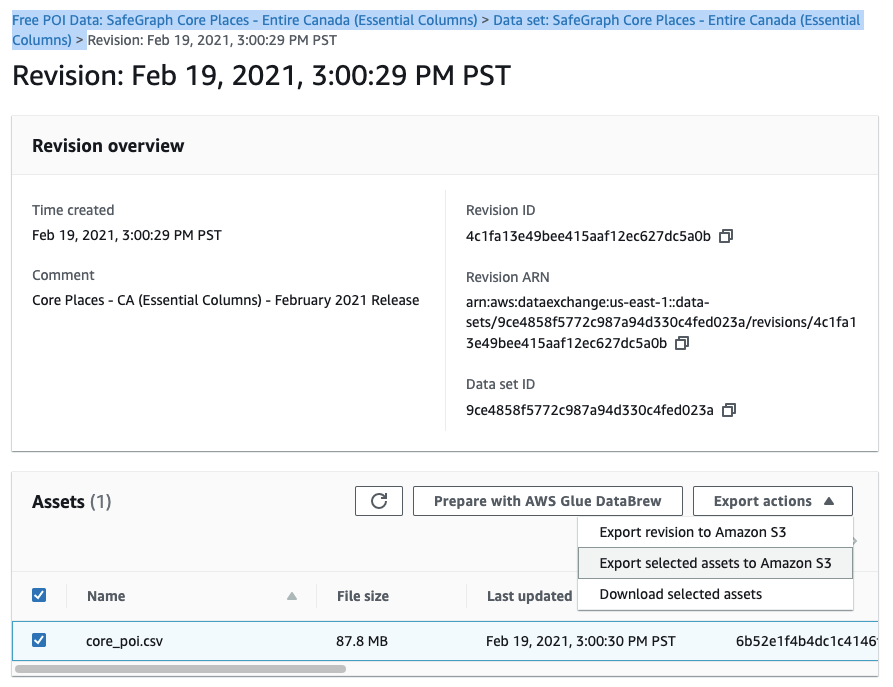
To start working with your dataset, first you need to export it to your own S3 bucket which you created previously. You can do this by choosing Free POI Data: SafeGraph Core Places - Entire Canada (Essential Columns) > Data set: SafeGraph Core Places - Entire Canada (Essential Columns) > (any available revision). Since we are interested in a single file, we can select “Export selected assets to Amazon S3”.
-
In the dialog box, choose the first S3 bucket name which you created in the previous steps, and confirm it by clicking the “Export” button
-
You can view the progress and completion of the export job in “Jobs” table list at the bottom of the page. After the state turns into “Completed”, you can start working with the dataset.